Is it my iPad, WiFi or ???

MissSkittles

Chameleon Enthusiast
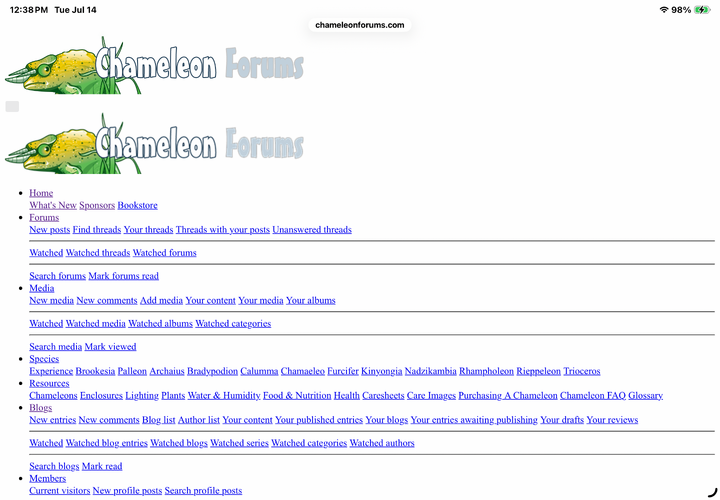
For a while now, I have been having issues with the forum and can’t figure out if it’s me or others are having the same. About 80% of the time when I go to the forum, I get the following look until I refresh the page and then it appears normal. For ease (laziness), I keep the tab with CF open most of the time with a few others I go to often. No issues with the other tabs, but every now and then I get a message that I’m not connected to the internet.
I do have crappy internet with Verizon.
IMG_0719.png
The other issue is when I go to like a post, the emojis pop up and before I can press one, it automatically chooses the thumbs up and emojis close. I have to press it several times before I can choose a different emoji, so if by chance you were watching your activity for a post you made, you might see that I liked it, unliked it, liked it, unliked it, etc until finally I can love it of other.
@Brad is it me? 🥺
 
If your browser is going into "HTML mode" like in the picture, it's usually a connection thing, but that could be either your modem or your actual device. If you mention what kind of device you are using, it can help them diagnose it.

It reminds me of when I used to have a Galaxy A13, it just really struggled with popup features. 😬 Both my PC and my current phone display the forum fine.
 
My phone has done this same thing on and off lately. I don’t use a computer, just my phone. I suspect a network thing idk lol I have Apple product so there’s that too. I just refresh, or log out then in and if that don’t work I turn my phone off and on again. Somehow it resolves quickly 😅
I mean it could be the website but I like blaming the electronics instead.
 
One easy thing to test: Download and log in on another internet app. Like if you are using the default Apple browser (Safari, I think?), you could go to your app store and get Mozilla Firefox or Google Chrome.

You just download and use it like you normally would to visit websites. Log in to the forum on the new browser and see if you still have the issue.
 
Hey love this is not your wifi. This is the device. Have you done the latest update on the device you are using? May very well be that the site is not communicating correctly if the device has not been updated. Mac likes to do lots of updates on its systems...
You may well have the answer. I cleared my cache (thanks @Brad ) and that has helped some, but not totally. There is an update that I’ve been blowing off. I’ll try that. I would love to take this as a reason to buy the latest iPad, but other things have to take priority. *adulting is no fun.😒
 
You may well have the answer. I cleared my cache (thanks @Brad ) and that has helped some, but not totally. There is an update that I’ve been blowing off. I’ll try that. I would love to take this as a reason to buy the latest iPad, but other things have to take priority. *adulting is no fun.😒
As long as your iPad can still get updates you do not have to worry about buying a new one. With Mac though things start to fail when the device is too old to get updates.
 
Back
Top Bottom